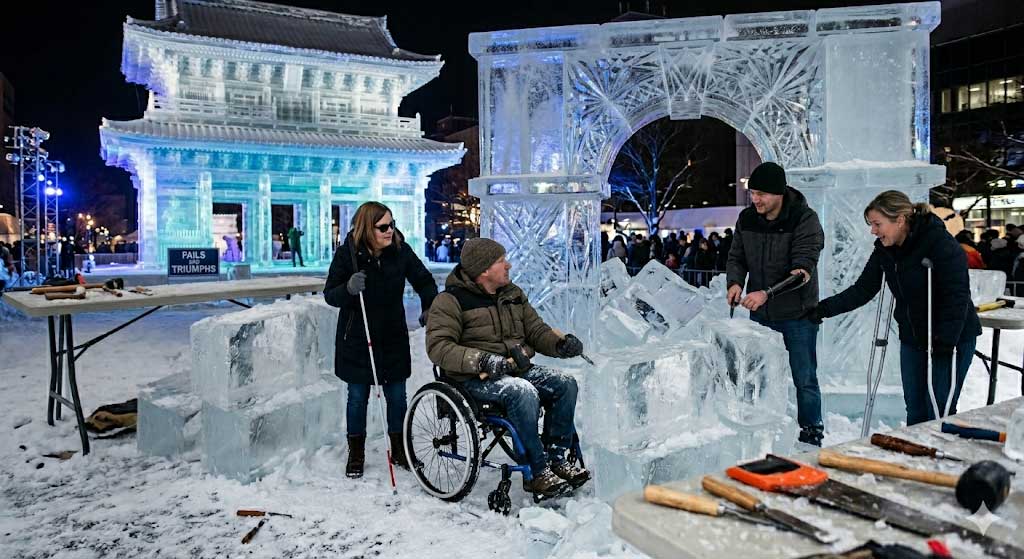
Walk into any hardware store in Sydney and you can leave with the exact toolkit a professional ice sculptor uses. Chisels of every gauge. Picks. Irons. A small blow torch. Same brand, same shape, same edge. Take it home, find the nearest block of ice, and start swinging.
What you produce will not look like an ice sculpture.
This is the part of accessibility that most marketing copy refuses to talk about.
Anyone can buy the toolkit
The accessibility software market is enormous and growing. Automated scanners. Code linters. Browser extensions. Design plugins. CI gates. Cloud platforms with the word "compliance" in big letters across the homepage. Overlay widgets and AI services promising to remediate a site in real time. Most of them are useful. Some are excellent. We curate dozens of them in our Top 40 Accessibility Software Tools directory, because they earn their place in a serious workflow.
But none of them, on their own, makes a digital product accessible. Not even the best of them.
What the tools genuinely do (be fair)
The chisel really does cut ice. It is not snake oil. Bring a chisel and a real ice sculptor to a block and you will get a sculpture. The chisel matters. So do accessibility tools. The honest things they do:
- Surface machine-detectable issues: missing
altattributes, inadequate colour contrast, form fields without labels, empty headings, table-for-layout antipatterns. We use them in every engagement and we cover the trade-off in detail in manual versus automated accessibility testing. - Speed up the obvious. A good scanner can clear the lowest-hanging issues before a human reviewer even opens the page.
- Produce an evidence trail. Tools generate logs, reports, regression data. Procurement, governance and reporting teams want that, and they should; see how we work for the deliverables we capture.
- Catch regressions in CI/CD. If you have shipped accessible code, automated checks help you keep it that way during refactors and CMS updates. See the accessibility for developers guide for the patterns that survive a refactor.
That is the honest extent of it. Tools detect, accelerate, document and protect. They do not produce.
What the tools cannot do
The harder, larger and more interesting parts of accessibility are the parts only a skilled human can do.
- Write meaningful alternative text. A tool can detect that an alt attribute is missing. It cannot reliably decide what an image means in context. Auto-generated descriptions of charts, infographics and editorial photography are routinely wrong, vague or actively misleading. The alternative text section in our document accessibility guide covers the judgement involved.
- Judge whether keyboard operation feels right. A scanner can check tab order exists. It cannot tell you whether the order makes sense to a switch-device user, whether a focus trap is a feature or a bug, or whether the focus indicator is visible to someone with low vision. The accessibility for developers guide covers the ARIA-and-focus traps that recur on real projects.
- Design for cognitive load. Plain language, predictable structure, consistent navigation, error recovery, working memory, attention. These are editorial and design decisions, made for real people, validated by user testing. The cognitive disabilities access need page and the accessibility for designers guide cover what good practice looks like.
- Choose between competing access needs. A reading mask helps some users with dyslexia (cognitive access need). It actively hurts some users with vision impairment (visual access need). A high-contrast theme helps one cohort and makes another physically nauseous. A skilled accessibility practitioner navigates these trade-offs deliberately. A tool just applies a rule. See disability types for the cohort map.
- Test with humans. A blind screen reader user (see JAWS vs NVDA vs VoiceOver vs TalkBack). A keyboard-only user. A voice-control user. A switch user. A user with photosensitive epilepsy. A user with severe ADHD trying to fill in a Centrelink form during a flare. No automation replaces this. Our assistive-technology user testing service exists because nothing else does the job.
- See the whole product. An accessibility tool examines a page. A practitioner examines a journey, a service, a publication estate, an organisation. That whole-of-product view sits in our audit and compliance and organisational uplift work.
Industry testing consistently puts automated coverage at roughly a third of the criteria in WCAG. The other two-thirds require human judgement. We cover the trade-off in detail in manual versus automated accessibility testing. Not because we feel like making the work harder. Because the criteria themselves are about meaning, intent and human experience.
The current marketing fairy tale
We are in a moment. Procurement teams are under pressure. The Australian Government Digital Service Standard compliance deadlines have passed (1 January 2025 for new services and 1 January 2026 for existing services). A vendor industry is pitching "buy the platform, problem solved." Increasingly, AI services are promising end-to-end accessibility for a subscription fee.
It is the same fairy tale every cycle. Buy the toolkit, get the sculpture.
We wrote recently about the most cynical version of this fallacy: accessibility overlay widgets, and the 2025 US Federal Trade Commission ruling against accessiBe for marketing claims that an automated widget could deliver WCAG compliance. The FTC fine was one million dollars. The fairy tale didn't die. The same idea is being repackaged as AI, every quarter, by every vendor with an enterprise sales target.
The same answer applies. Tools are the start. The work is the work.
Why this trap is so seductive
- It is cheap. A subscription is much smaller than an audit, a remediation programme and a training plan.
- It is fast. You install the script today and ship the press release tomorrow.
- It looks like action. You have done a thing. You can point at the thing in a steering committee deck.
- It pushes responsibility onto a vendor. If it goes wrong, that is the vendor's problem.
- And most importantly, it lets organisations defer the part that is actually hard: changing how design, content, development, procurement and governance treat accessibility as quality, not as a bolt-on. We made this argument in full in accessibility isn't a button or an add-on.
None of the seductions hold up. The subscription is annual, not one-time. The fast install is undone by the next CMS update. The "thing you have done" is detectable in three clicks by any user with a screen reader. The vendor's problem becomes your reputational problem when an Australian Human Rights Commission complaint lands. And the hard part remains hard, except now it has been deferred by a year.
What the ice sculptor has, that the chisel doesn't supply
Years of practice. A learned eye for the way different cuts behave at different temperatures. Knowledge of how the audience will see the finished piece from every angle. Composure under time pressure. Failures, recovered from. A teacher, somewhere in the past, who corrected the grip.
The accessibility equivalent:
- Formal training. The standards (WCAG 2.2, PDF/UA, EN 301 549, see VPAT and ACR), the techniques and the failure modes they prevent. We cover the accreditation lineage of our own named lead on the How We Work page, but the broader point is that this discipline rewards study and is what structured accessibility training exists to provide.
- Live exposure to assistive technology. Watching, repeatedly, what a screen reader does when the code is wrong. Listening to a voice-control user attempt your form. Working with a switch user through a checkout. These hours compound, and that is exactly what our assistive-technology user testing service exists to deliver to your team.
- Knowledge across multiple disability cohorts. Vision, hearing, motor, cognitive, neurological, speech, situational. Each is a different audience with different access needs. Each has criteria that conflict with the others if treated naively. The skill is the trade-off, not the rule. See disability types for the cohort map.
- Editorial judgement about content. Plain language, link text, captions, transcripts, image descriptions. None of this is automatable, and none of it is optional. Where audiences need more than tagged content, alternative formats (Easy Read, large print, audio, Braille) are the answer.
- Process discipline. Embedding accessibility into design briefs, development workflows, content sign-off, procurement standards, vendor management. Tools without process is a one-time clean-up. Process is what makes new accessibility stick. We explore this in from reactive to resilient: building accessibility maturity and deliver it through organisational uplift and consulting and strategy engagements.
That is the substance. The chisels matter, but they are not the work.
How to think about your toolkit
Tools should be chosen for what they actually do, not for what they claim. Useful questions:
- What proportion of WCAG criteria does this tool address with high confidence, and what is left for human review?
- Does this tool integrate with how my team already works (browser, IDE, CI, design plugin, CMS), or does it create a new silo?
- What does this tool produce as output that a procurement officer or a board can actually rely on?
- Does this tool replace expert judgement, or support it?
The last question is the one. A tool that supports expert judgement is an investment. A tool that claims to replace it is a marketing promise.
If you want a curated starting list of tools that do what they say, we keep one at the Top 40 Accessibility Software Tools directory. If you want help building the practice around them, that is what we do as a service.
The bottom line
Anyone can buy a chisel. Not anyone can sculpt.
Anyone can subscribe to an accessibility tool. Not anyone can deliver an accessible product across every cohort of disability your audience contains.
If your organisation is mid-procurement on an accessibility platform: pick a good one, use it, and let it earn its keep. But understand what you have bought. A tool, not a result. The result still requires the people, the process, the training, the testing, the trade-offs and the judgement. See how we work for what that delivery actually looks like.
The work is the work.